Dynamic On-Screen Voting
Platforms


Software


Overlay Available Browser Source Dock
Create on-screen polls with real-time vote bars, countdowns, and chat commands — fully controllable from a built-in dock with save/load support.
5.0(1 Review)
299Downloads
Download Dynamic On-Screen Voting
Click the button below to download Dynamic On-Screen Voting! If you find it useful, consider leaving a tip to support development.
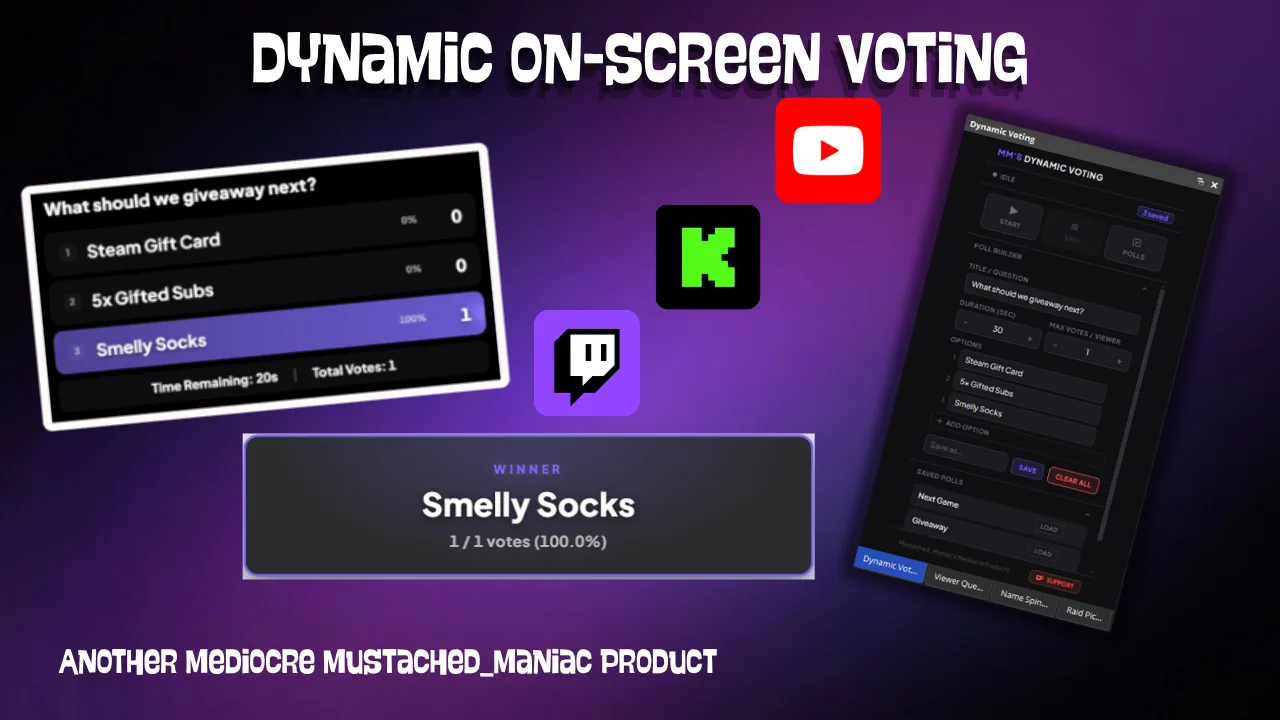
This Streamer.bot extension adds fully dynamic on-screen voting to your stream. Start a poll from chat or from the dock, let viewers vote with !vote, and watch the bars fill in live. Polls can be saved and reloaded at any time, so your favorite recurring votes are always one click away.
How Dynamic Voting Works
The extension has two components:
- Overlay — A transparent browser source that shows the poll on stream. Displays the question, each option with an animated fill bar and live vote count, a countdown timer, and the total votes cast.
- Dock — A control panel you can add to OBS, Meld, or SLOBS. Build a new poll from scratch, set the duration and max votes per viewer, or load a saved poll. You can also end a running poll early from the dock.
Customizing the Overlay URL
https://mustachedmaniac.com/widgets/Dynamic_Voting
Live Preview
| Parameter | Example | Description |
|---|---|---|
host | 192.168.1.1 | Only needed if your Streamer.bot WebSocket address is not 127.0.0.1 |
port | 8118 | Only needed if your Streamer.bot WebSocket port is not 8080 |
endpoint | /stuff | Only needed if your Streamer.bot WebSocket endpoint is not / |
password | mYp@$$ | Only needed if you have authentication enabled on your WebSocket server |
align | left | Position of the poll panel — left, center, or right (default: center) |
font | Roboto | Any Google Font name (default: Plus Jakarta Sans) |
fontColor | #ffffff | Text color for option labels and the footer (default: #ffffff) |
progressColor | #7c6af7 | Fill color for the vote bars (default: #7c6af7) |
bg | #0f0f11 | Background color of the option cards and footer (default: dark near-black) |
opacity | 80 | Background opacity as a percentage, 1–99 (default: 88) |
shadow | On | Enable a text shadow — On or Off. Pair with shadowColor and shadowBlur |
shadowColor | #000000 | Color of the text shadow (default: #000000) |
shadowBlur | 8 | Blur radius of the text shadow in pixels, 0–50 (default: 8) |
winnerDelay | 15 | Seconds to keep the winner on screen before hiding the overlay, 5–30 (default: 10) |
Customizing the Dock URL
https://mustachedmaniac.com/widgets/Dynamic_Voting/dock
The dock URL also accepts
host, port, endpoint, and password parameters — if your WebSocket server isn't on the defaults, add those to the dock URL as well.Available Chat Commands
| Command | Description |
|---|---|
!vote 1 | Cast a vote for option 1 (number matches the option's position in the list) |
!startVote | Start a new poll with the current settings configured WITHIN Streamer.bot |
!endVote | End the current poll early and show the winner (if any) |
!saveVote [name] | Save the current poll settings to the dock's saved polls list (requires a name) |
listPolls | List all saved polls in the dock with their assigned numbers for loading |
!loadPoll [name] or !loadPoll [number] | Load a saved poll from the dock's saved polls list |
!deletePoll [name] or !deletePoll [number] | Delete a saved poll from the dock's saved polls list |
Streamer.bot Arguments
The following arguments are available when a poll starts or a vote is cast.
| Argument | Type | Description |
|---|---|---|
pollTitle | string | The poll question/title |
pollOptions | json | Array of option objects with prompt and voteCount |
pollDuration | int | Poll duration in seconds |
maxVotesPerViewer | int | Maximum number of times a single viewer can vote |
pollOption1VoteCount … | int | Current vote count for each individual option |
totalMultiVotes | int | Total votes cast across all options |
winningMultiPollOption | string | Variable name of the winning option after the poll ends |
Changelog
Updatev2.2 Swapped Loading Polls from Command LogicApr 30, 2026
Updatev2.1 Fixed 'Start Poll' Dock ButtonApr 29, 2026
Releasev2.0 Re-ReleaseApr 29, 2026
Releasev1.0 Initial releaseJul 9, 2024
